A desktop environment for AI agents, in one Dockerfile (locally and on Agent Substrate)
Claude Code, Chromium and Chrome DevTools MCP on a headless Wayland desktop you can watch over noVNC, running in a Substrate actor that suspends and resumes mid-task.
Agents are good at the web now, but I want to see what they are doing, and take over when they get stuck. This post builds a small Wayland desktop for an agent: Claude Code in a terminal on one side, Chromium on the other, and noVNC so I can watch from my own browser. It is one Dockerfile. Then it runs inside an Agent Substrate actor, which sandboxes it, keeps the API key out of it, and can suspend the whole desktop mid-task and bring it back.
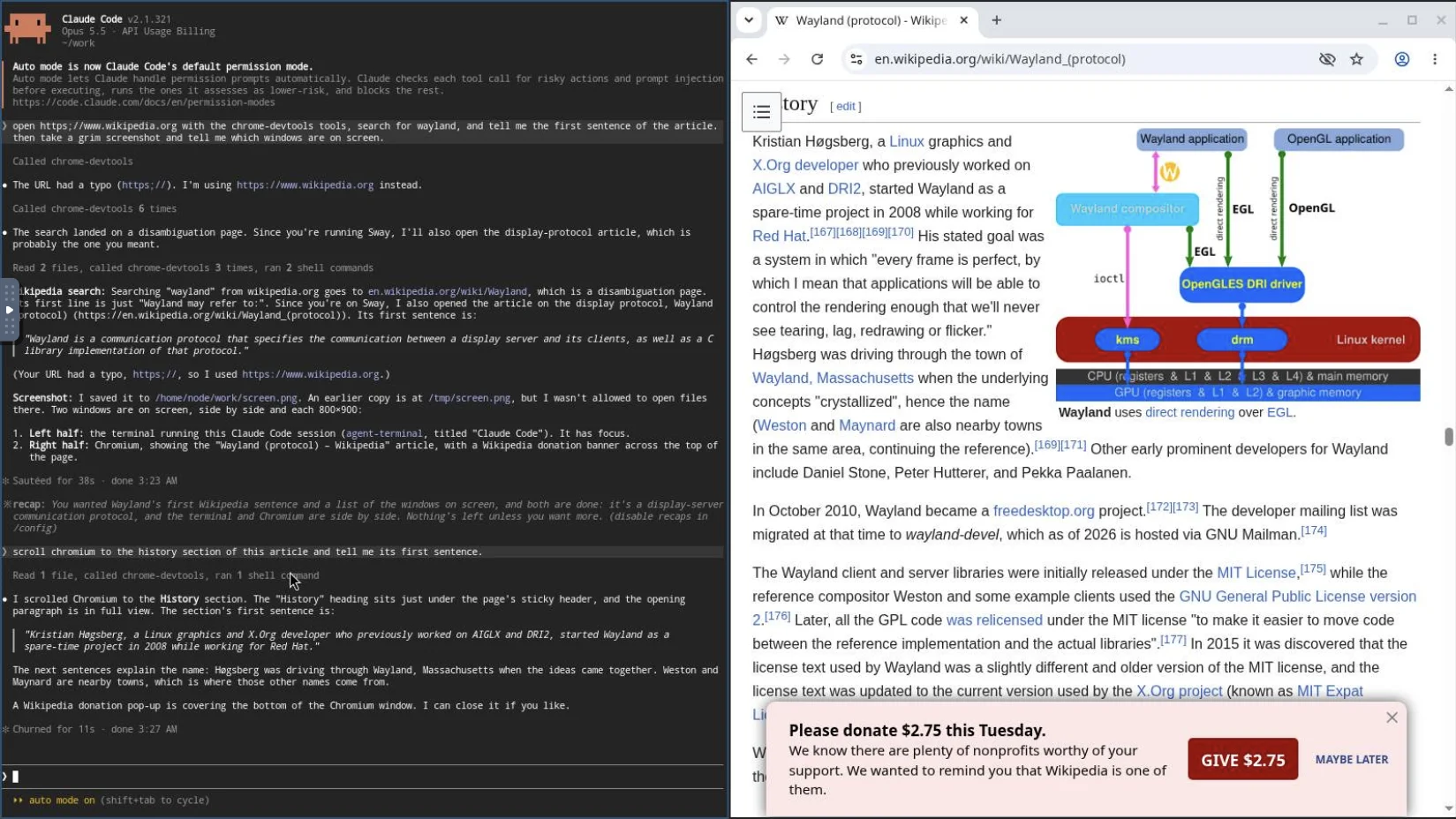
What's in the box
| Piece | Choice | Why |
|---|---|---|
| Compositor | Sway, headless backend, Pixman renderer | A real Wayland desktop with no GPU, DRM or input devices |
| Browser | Debian's Chromium with --ozone-platform=wayland | Native Wayland, sandbox on, DevTools Protocol on 127.0.0.1:9222 |
| Agent | Claude Code | Interactive, so I can type to it through the same desktop |
| Terminal | foot | Native Wayland and renders on the CPU. GPU terminals like Ghostty, kitty or Alacritty need OpenGL, which here would mean slow software rendering |
| Browser tools | Chrome DevTools MCP | Attaches to the Chromium you are watching, not a hidden headless one |
| Computer use | grim, wtype, swaymsg | Screenshots, typing and clicking for everything that isn't a web page |
| Remote view | wayvnc, websockify and noVNC | wayvnc serves the desktop over VNC with a password. websockify bridges it to a WebSocket and serves noVNC, the VNC client that runs in your browser |
There is no Xwayland and no X11. Everything except websockify (port 6080) listens on loopback inside the container.
The agent gets two ways to act. For the web it uses the MCP tools, which work on the DOM and the
accessibility tree and are much more reliable than clicking pixels. For anything else on the screen
it falls back to computer use: grim takes a screenshot that it can read, swaymsg seat seat0 cursor
moves and clicks the pointer, and wtype types. A short CLAUDE.md in the image tells it so.
The Dockerfile
Everything is inline in a single dockerfile (download it here):
# syntax=docker/dockerfile:1
# A Wayland desktop for an agent: headless Sway, Chromium with the Chrome
# DevTools Protocol on loopback, Claude Code with Chrome DevTools MCP, and
# noVNC so a human can watch and take over.
FROM node:22-trixie-slim

RUN apt-get update \
 && DEBIAN_FRONTEND=noninteractive apt-get install -y --no-install-recommends \
      ca-certificates chromium chromium-sandbox curl dbus fonts-liberation \
      fonts-noto-cjk fonts-noto-color-emoji fonts-noto-core foot git grim jq \
      novnc sway wayvnc websockify wtype \
 && rm -rf /var/lib/apt/lists/*

RUN npm install -g @anthropic-ai/claude-code@2.1.321 chrome-devtools-mcp@1.12.0 \
 && npm cache clean --force

COPY <<'EOF' /etc/desktop/sway.conf
xwayland disable
output HEADLESS-1 mode 1600x900
seat seat0 fallback true
default_border pixel 2
EOF

COPY --chmod=755 <<'EOF' /usr/local/bin/desktop
#!/usr/bin/env bash
set -euo pipefail
export XDG_RUNTIME_DIR=/tmp/runtime-$(id -u)
mkdir -p -m 700 "$XDG_RUNTIME_DIR"
exec dbus-run-session -- /usr/local/bin/desktop-session
EOF

COPY --chmod=755 <<'EOF' /usr/local/bin/desktop-session
#!/usr/bin/env bash
set -euo pipefail
trap 'kill $(jobs -p) 2>/dev/null || true' EXIT

wait_for() {  # wait_for <seconds> <description> <command...>
    local deadline=$((SECONDS + $1)) what=$2; shift 2
    until "$@" >/dev/null 2>&1; do
        ((SECONDS < deadline)) || { echo "timed out waiting for $what" >&2; exit 1; }
        sleep 0.2
    done
}
window_open() { swaymsg -t get_tree | jq -e --arg id "$1" '[.. | objects | select(.app_id? == $id)] | length > 0'; }

# Headless wlroots with software rendering: no GPU, DRM or input devices needed.
export WLR_BACKENDS=headless WLR_RENDERER=pixman WLR_LIBINPUT_NO_DEVICES=1
sway --config /etc/desktop/sway.conf &
wait_for 30 sway bash -c 'compgen -G "$XDG_RUNTIME_DIR/sway-ipc.*.sock" && compgen -G "$XDG_RUNTIME_DIR/wayland-*"'
export SWAYSOCK=$(compgen -G "$XDG_RUNTIME_DIR/sway-ipc.*.sock")
export WAYLAND_DISPLAY=$(basename "$(compgen -G "$XDG_RUNTIME_DIR/wayland-[0-9]")")

# Skip Claude Code's "use this API key?" prompt for the key we were given.
if [[ -n ${ANTHROPIC_API_KEY:-} ]]; then
    jq --arg k "$ANTHROPIC_API_KEY" '.customApiKeyResponses.approved += [$k[-20:]]' \
        "$HOME/.claude.json" > /tmp/claude.json && mv /tmp/claude.json "$HOME/.claude.json"
fi

# The agent's terminal on the left, Chromium on the right.
mkdir -p "$HOME/work"
foot --app-id agent-terminal --working-directory "$HOME/work" bash -l -c 'claude; exec bash -l' &
wait_for 30 "the terminal" window_open agent-terminal
chromium --user-data-dir="$HOME/.config/chromium" --ozone-platform=wayland \
    --remote-debugging-port=9222 --remote-debugging-address=127.0.0.1 \
    --disable-gpu --disable-quic --disable-dev-shm-usage --password-store=basic \
    --no-first-run --no-default-browser-check about:blank &
wait_for 60 Chromium window_open chromium
wait_for 30 "the DevTools endpoint" curl -sf http://127.0.0.1:9222/json/version

# VNC with a password. relax_encryption enables Apple Diffie-Hellman auth,
# which noVNC supports. Only websockify listens beyond loopback, on port 6080.
password=${VNC_PASSWORD:-$(head -c 12 /dev/urandom | base64)}
mkdir -p -m 700 "$XDG_RUNTIME_DIR/wayvnc"
cat > "$XDG_RUNTIME_DIR/wayvnc/config" <<CONFIG
enable_auth=true
relax_encryption=true
username=agent
password=$password
CONFIG
wayvnc --config "$XDG_RUNTIME_DIR/wayvnc/config" 127.0.0.1 5900 &
wait_for 30 wayvnc bash -c 'exec 3<>/dev/tcp/127.0.0.1/5900'
[[ -n ${VNC_PASSWORD:-} ]] || echo "noVNC password: $password"

mkdir -p /tmp/novnc
cp -rs /usr/share/novnc/. /tmp/novnc/
echo ready > /tmp/novnc/readyz
websockify --web=/tmp/novnc 6080 127.0.0.1:5900 &

wait -n
echo "a desktop process exited" >&2
exit 1
EOF

USER node
ENV HOME=/home/node CLAUDE_CODE_DISABLE_NONESSENTIAL_TRAFFIC=1 DISABLE_AUTOUPDATER=1
WORKDIR /home/node/work

COPY --chown=node:node <<'EOF' /home/node/.claude/CLAUDE.md
# Your desktop

You run in a terminal on a Wayland (Sway) desktop. A human may be watching it
over VNC. Chromium is open next to you.

- Prefer the `chrome-devtools` MCP tools for the web. They drive that same
  Chromium window, so the human sees what you do.
- For anything else on screen, use computer-use commands:
  - Screenshot: `grim screen.png`, then read it. The screen is 1600x900.
  - Window positions: `swaymsg -t get_tree | jq '.. | objects | select(.app_id?) | {app_id, rect}'`
  - Focus a window: `swaymsg '[app_id=chromium] focus'`
  - Click at x,y: `swaymsg seat seat0 cursor set X Y && swaymsg seat seat0 cursor press button1 && swaymsg seat seat0 cursor release button1`
  - Type: `wtype 'text'`; press a key: `wtype -k Return`
EOF

COPY --chown=node:node <<'EOF' /home/node/.claude/settings.json
{
  "permissions": {
    "allow": [
      "mcp__chrome-devtools",
      "Read(//tmp/**)",
      "Bash(grim:*)",
      "Bash(swaymsg:*)",
      "Bash(wtype:*)"
    ]
  }
}
EOF

RUN claude mcp add --scope user chrome-devtools -- \
      chrome-devtools-mcp --browserUrl http://127.0.0.1:9222 --no-usage-statistics --no-performance-crux \
 && jq '.hasCompletedOnboarding = true | .theme = "dark" | .projects["/home/node/work"].hasTrustDialogAccepted = true' \
      ~/.claude.json > /tmp/claude.json && mv /tmp/claude.json ~/.claude.json

EXPOSE 6080
ENTRYPOINT ["/usr/local/bin/desktop"]
A few things worth pointing out:
- Startup order.
desktop-sessionwaits for each piece before starting the next one, and only creates/readyzonce Sway, the terminal, Chromium, the DevTools endpoint and VNC are all up. Substrate uses that file to decide when the desktop is ready. - VNC password. wayvnc offers RSA-AES auth that noVNC doesn't speak.
relax_encryption=trueturns on Apple Diffie-Hellman auth, which noVNC does support. It protects the password, but the session itself is not encrypted, so noVNC says "Connected (unencrypted)". Keep the port on loopback. SetVNC_PASSWORD, or the container picks a random one and prints it. - Claude Code is pre-configured: the MCP server is added with
claude mcp add, onboarding and the folder trust prompt are skipped, and whateverANTHROPIC_API_KEYit starts with is pre-approved. The MCP and computer-use commands are allowed insettings.json, so it doesn't ask before each click.
Try it in Docker
docker build -f agent-browser-box.Dockerfile -t agent-browser-box .
docker run --rm --security-opt seccomp=unconfined \
  -e ANTHROPIC_API_KEY -e VNC_PASSWORD=change-me \
  -p 127.0.0.1:6080:6080 agent-browser-box
Open http://127.0.0.1:6080/vnc.html?autoconnect=true&resize=scale, log in as agent, click the
terminal and give Claude something to do in the browser.
Why seccomp=unconfined? Chromium's sandbox needs user namespaces, and Docker's default seccomp
profile blocks them. I would rather loosen seccomp than run Chromium with --no-sandbox. Under
Substrate this flag isn't needed: gVisor and the microVM runtime both let the sandbox work as is.
In plain Docker, the agent also holds your real API key, and anything it runs can read it. That is the next thing to fix.
Run it on Substrate
Agent Substrate runs workloads like this as actors on Kubernetes. Three features matter here:
- Isolation. Each actor runs in gVisor or in a microVM (Cloud Hypervisor), not as a plain container.
- Suspend and resume. An actor's whole memory is snapshotted when it suspends. The desktop, the open tabs and Claude's conversation come back exactly where they were.
- Egress credential injection. The actor only has a placeholder API key. The egress gateway swaps in the real key on the way out, so it is never in the actor's memory, disk or snapshots.
Credential injection on the agentgateway dataplane landed on Substrate's main after v1.0.0 (v1.0.0 supports it with Envoy only). I tested this with a build of main at 94e0a26a on a local kind cluster.
Install Substrate
From a clone of the Substrate repository, create a kind cluster and install Substrate with the agentgateway dataplane and the Kubernetes Secrets credential provider:
hack/create-kind-cluster.sh
export ATE_INSTALL_KIND=true
go run ./cmd/ate-setup deploy ate-system \
  --atenet-dataplane=agentgateway \
  --credential-provider='{"name":"k8s.io"}' \
  --ingress-allowed-spiffe-ids=spiffe://cluster.local/ns/ate-system/sa/atenet-client
go install ./cmd/kubectl-ate

# Worker images that match this build. Prints ateworker-gvisor: <ref> and ateworker-microvm: <ref>.
go run ./cmd/ate-setup --kind publish worker-images | tee worker-images.txt
If the host has /dev/kvm, the cluster script also sets up the microVM runtime.
Push the image
Push the image to the cluster's local registry and pin it by digest:
docker build -f agent-browser-box.Dockerfile -t localhost:5001/agent-browser-box:v1 .
DIGEST=$(docker push localhost:5001/agent-browser-box:v1 | sed -n 's/.*digest: \(sha256:[0-9a-f]*\).*/\1/p')
IMAGE=localhost:5001/agent-browser-box@$DIGEST
Worker pool and atespace
Pick a runtime, gvisor or microvm. The rest of the commands are the same for both.
RUNTIME=gvisor
WORKER_IMAGE=$(sed -n "s/^ateworker-$RUNTIME: //p" worker-images.txt)
kubectl create namespace agent-browser-box

if [ "$RUNTIME" = microvm ]; then
  CLASS='[{"name": "microvm", "configRef": {"name": "microvm"}}]'
  POD='{"resources": {"requests": {"cpu": "250m", "memory": "5Gi"}, "limits": {"cpu": "3", "memory": "5Gi"}}}'
else
  CLASS='[{"name": "gvisor"}]'
  POD='{}'
fi
kubectl apply -f - <<EOF
apiVersion: ate.dev/v1
kind: WorkerPool
metadata:
  name: agent-browser-box-$RUNTIME
  namespace: agent-browser-box
  labels: {workload: agent-browser-box-$RUNTIME}
spec:
  replicas: 1
  workerImage: $WORKER_IMAGE
  sandboxClasses: $CLASS
  template: $POD
EOF

kubectl ate create atespace agent-browser-box
The microVM pool asks for more memory because the worker pod also holds the VM's memory.
The API key
Put the real key in a Kubernetes Secret. The actor never reads this Secret. Only the credential provider does, when the egress gateway asks it to.
kubectl -n agent-browser-box create secret generic anthropic --from-literal=api-key="$ANTHROPIC_API_KEY"The provider denies everything by default. Allow actors in the agent-browser-box atespace to use
Secrets in the agent-browser-box namespace, and restart the provider to pick up the change:
kubectl -n ate-system patch configmap k8s-credential-provider-namespace-policy --type merge -p '
data:
  namespace-policy.yaml: |
    policies:
    - atespace: agent-browser-box
      allowedNamespaces: [agent-browser-box]
'
kubectl -n ate-system rollout restart deployment/k8s-credential-provider
The actor template
VNC_PASSWORD=$(head -c 12 /dev/urandom | base64)
echo "noVNC password: $VNC_PASSWORD"

kubectl ate create actor-template -f - <<EOF
metadata:
  atespace: agent-browser-box
  name: desktop-$RUNTIME
workerSelector:
  matchLabels: {workload: agent-browser-box-$RUNTIME}
containers:
- name: desktop
  image: $IMAGE
  env:
  - {name: ANTHROPIC_API_KEY, value: placeholder-the-gateway-replaces-this}
  - {name: NODE_EXTRA_CA_CERTS, value: /run/ate/egress-trust-bundle/trust-bundle.pem}
  - {name: VNC_PASSWORD, value: "$VNC_PASSWORD"}
  volumeMounts:
  - {name: system-info, mountPath: /run/ate/egress-trust-bundle}
  wakeupProbe:
    httpGet: {path: /readyz, port: 6080}
    timeoutSeconds: 120
volumes:
- name: system-info
  systemInfo:
    dataSources:
    - trustBundle:
        names: [egress-mitm.ate.dev, system-roots.ate.dev]
        path: trust-bundle.pem
resources:
  limits: {cpuMillicores: 2000, memoryBytes: 4294967296}
snapshotConfig:
  preferredFidelity: SNAPSHOT_FIDELITY_MEMORY
EOFANTHROPIC_API_KEYis a placeholder. Claude Code sends it in thex-api-keyheader, and the gateway replaces it.- To replace a header, the gateway has to terminate TLS for
api.anthropic.com. ThetrustBundlevolume mounts the gateway's CA next to the public roots, andNODE_EXTRA_CA_CERTSmakes Claude Code trust it. wakeupProbeis the/readyzfile from the Dockerfile.- Creating the template boots the desktop once and takes a golden snapshot when it is ready. Every actor from this template resumes from that snapshot, in a couple of seconds, instead of booting Sway and Chromium again.
The actor and its egress policy
kubectl ate create actor desktop --template=desktop-$RUNTIME -a agent-browser-box

kubectl ate create egress-policy desktop -a agent-browser-box -f - <<EOF
rules:
- https:
    hostnames: [api.anthropic.com]
    effects:
      replaceHeaders:
      - header: x-api-key
        credentialUri: ate-secret://k8s.io/default/agent-browser-box/anthropic/api-key
- tlsPassthrough:
    hostnames: ["*"]
    ports: {numbers: [443]}
- http:
    hostnames: ["*"]
    ports: {numbers: [80]}
EOF
When several rules match, the most specific hostname wins. Requests to api.anthropic.com hit the
https rule: the gateway decrypts them, swaps the placeholder for the Secret, and sends them on.
Everything else Chromium does goes through tlsPassthrough untouched, so websites see Chromium's
own TLS and nothing needs to trust the gateway CA. QUIC is blocked, so Chromium runs with
--disable-quic.
The wildcards let the agent browse anywhere. For anything real, replace "*" with the sites the agent needs.
Connect
kubectl ate proxy actor desktop 6080:6080 -a agent-browser-box --address 127.0.0.1Open http://127.0.0.1:6080/vnc.html?autoconnect=true&resize=scale and log in as agent with the
password from above. The first connection resumes the actor from the golden snapshot.
Ask Claude to do something in the browser. In the egress gateway's logs you can see its requests
to /v1/messages, and the gateway fetching the key from the credential provider:
kubectl -n ate-system logs deployment/atenet-egress | grep -E 'v1/messages|FetchSecret'Suspend it mid-task
Disconnect noVNC (or close the tab), then:
kubectl ate suspend actor desktop -a agent-browser-box --mode sync
kubectl ate get actor desktop -a agent-browser-box
Once it is ACTOR_STATE_SUSPENDED, the worker is free for other actors. Reconnect noVNC and the
actor resumes: same tabs, same scroll position, same Claude conversation. Claude can continue
from there, and its next API call goes through the gateway as before.
The noVNC WebSocket does not survive the suspend, so disconnect first and reconnect after.
Things to know
- The golden snapshot is shared. Everything that happens before
/readyzis in the template's snapshot, so every actor from one template starts with the same VNC password and the same fresh Chromium profile. For a password per actor, create a template per actor. - The desktop is only as private as the proxy. Keep
kubectl ate proxyon127.0.0.1. Don't publish port 6080 with a Service or Ingress. The DevTools port never leaves the actor. - If Claude Code can't authenticate, check where the request stopped. "authentication rejected
(401)" means the placeholder reached Anthropic, so the
httpsrule didn't match. A 403 or 503 means the gateway couldn't fetch the Secret: check the Secret's name and key, the namespace policy, and that you restarted the credential provider after editing it. - Runtimes. The same image ran under gVisor and the microVM runtime, including suspend and resume in the middle of a task, with no changes.
Cleaning up
kubectl ate delete actor desktop -a agent-browser-box
kubectl ate delete actor-template desktop-$RUNTIME -a agent-browser-box
kubectl ate delete atespace agent-browser-box
kubectl delete namespace agent-browser-box
Or delete the whole kind cluster with hack/delete-kind-cluster.sh.